API Settings
Control whether InfusedWoo uses Keap's REST API or legacy XML-RPC for each service.
API Settings
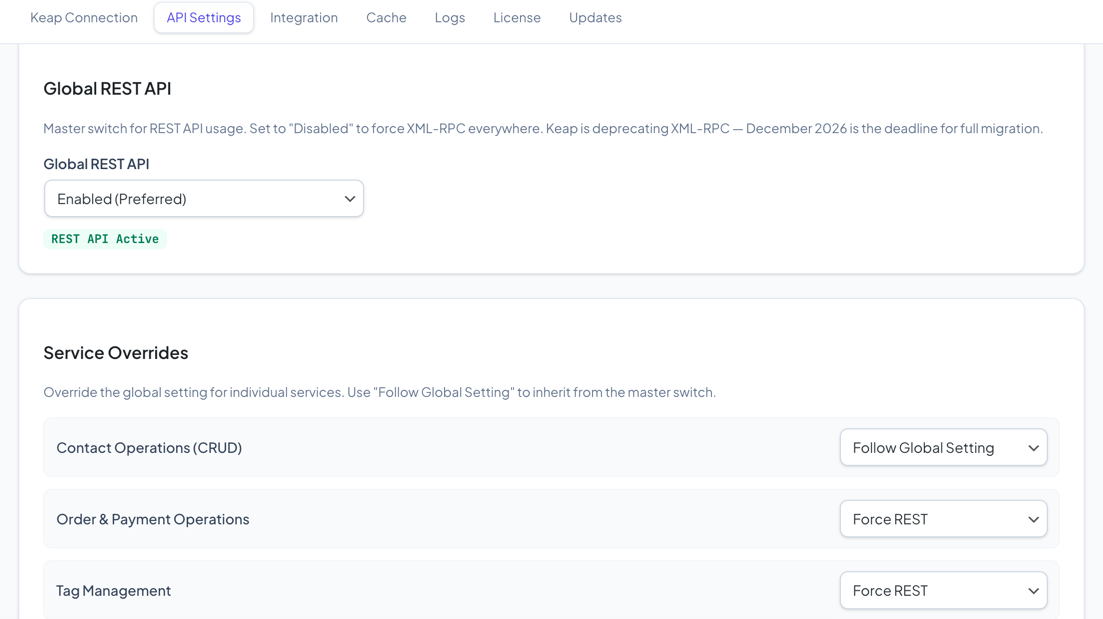
Control whether InfusedWoo uses Keap’s REST API (v2) or the legacy XML-RPC API for communication. The REST API is faster, more reliable, and is the recommended option.
Navigate to InfusedWoo > Settings > API Settings.
REST API vs XML-RPC
| Feature | REST API (v2) | XML-RPC (Legacy) |
|---|---|---|
| Performance | Faster | Slower |
| Reliability | Better error handling | Basic error handling |
| Future support | Actively developed | Deprecated December 2026 |
| Rate limits | Higher limits | Lower limits |
Keap is deprecating XML-RPC in December 2026. We recommend migrating to the REST API now.
Global Switch
The master toggle controls the default API for all services:
- Enabled (default) — All services use the REST API
- Disabled — All services use XML-RPC
Per-Service Override
Override the global setting for individual services:
| Service | What it controls |
|---|---|
| Contacts | Contact creation and updates |
| Orders | Order creation and payment recording |
| Tags | Tag application and removal |
| Products | Product data syncing |
| Companies | Company record syncing |
| Campaigns | Campaign goal triggering |
| Subscriptions | Subscription management |
| Affiliates | Affiliate/referral partner tracking |
Each service can be set to:
- Use Global — Follow the master toggle
- Enabled — Always use REST API
- Disabled — Always use XML-RPC
Debug Mode
Enable debug logging for API calls:
- Off — No API debug logging
- On — Log API requests and responses
- Verbose — Detailed logging including request/response bodies
Check logs in Settings > Logs after enabling debug mode.
Tips
- If something isn’t working after switching to REST API, try switching just that service back to XML-RPC to isolate the issue
- Use debug mode temporarily when troubleshooting — it generates significant log data
- After testing, switch everything to REST API for best performance