Other Payment Gateways
Control how orders from PayPal, Stripe, and other gateways sync to Keap.
Other Payment Gateways
By default, InfusedWoo syncs contacts, tags, and campaign goals for all WooCommerce orders regardless of payment method. This page controls whether orders from non-Keap gateways (PayPal, Stripe, bank transfer, etc.) also create order records in Keap’s Ecommerce module.
Navigate to InfusedWoo > Payments > Other Gateways.
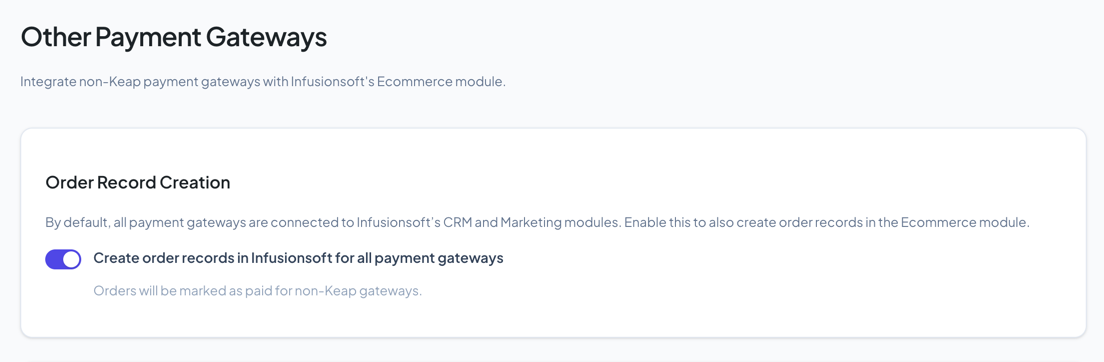
Order Record Creation
Toggle Create order records in Infusionsoft for all payment gateways to enable or disable this feature.
When enabled:
- Orders from PayPal, Stripe, bank transfer, COD, and other gateways are recorded in Keap’s Ecommerce module
- Orders are marked as paid with the mapped payment type
When disabled:
- Contacts are still created/updated in Keap
- Tags and campaign goals still fire
- But no order record appears in Keap’s Ecommerce reports
Payment Type Mapping
When order recording is enabled and the REST API is active, a mapping table appears. This maps each WooCommerce gateway to a Keap manual payment type.
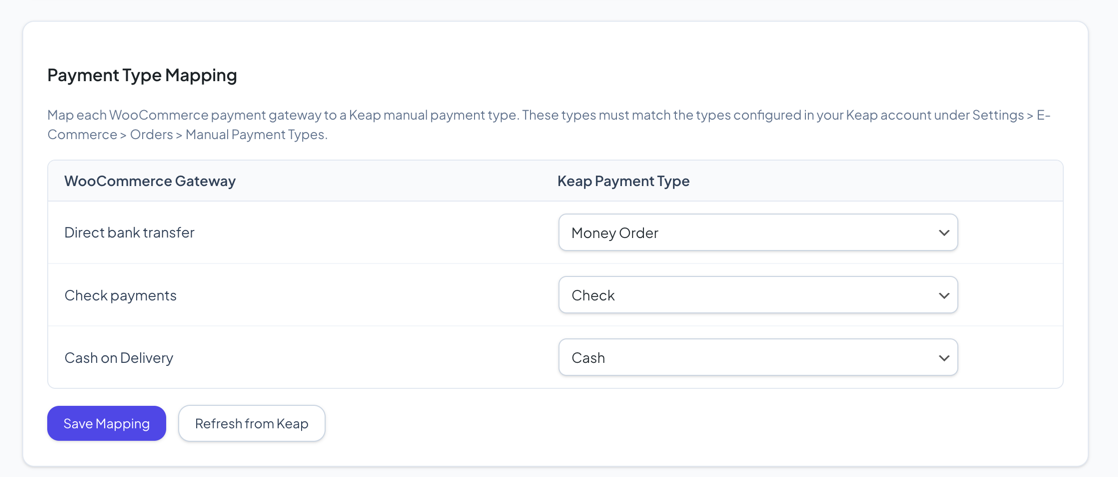
| Column | Description |
|---|---|
| WooCommerce Gateway | The active payment gateways on your store |
| Keap Payment Type | The matching manual payment type in Keap |
The available Keap payment types come from your Keap account under Settings > E-Commerce > Orders > Manual Payment Types. Click Refresh from Keap to reload the list.
Setting Up Payment Types in Keap
If you don’t see the payment type you need:
- Log in to Keap
- Go to Settings > E-Commerce > Orders
- Under Manual Payment Types, add new types (e.g., “PayPal”, “Stripe”, “Bank Transfer”)
- Come back to InfusedWoo and click Refresh from Keap
Tips
- If you only care about contact syncing and tags (not Keap order records), leave this disabled
- The payment type mapping only appears when using the REST API. Legacy XML-RPC uses a default type.