Triggers
All available automation recipe triggers and how to configure them.
Triggers define when a recipe runs. Each recipe has exactly one trigger. When the trigger event occurs, the recipe evaluates its conditions and executes its actions.
Available Triggers
Standard Triggers
| Trigger | Description | Use Cases |
|---|---|---|
| Purchase Trigger | Fires when a WooCommerce order payment is completed | Tag customers after purchase, sync orders to Keap, send follow-up emails |
| Order Status Change | Fires when an order’s status changes (e.g., pending to processing) | Notify customers of shipping, update Keap records on refunds |
| Order Creation | Fires when a new order is created (before payment) | Capture leads at checkout, apply pre-payment tags |
| Add to Cart | Fires when a product is added to the cart | Show popups, apply automatic discounts, track interest |
| Checkout Trigger | Fires when a customer reaches the checkout page | Apply cart-level discounts, show notices, free shipping |
| Page Visit | Fires when a user visits a specific page | Show targeted popups, track page views, apply page-specific discounts |
| User Action | Fires when a user performs a custom action (via JavaScript/HTTP) | Track custom events, handle form submissions |
| User Consent (GDPR) | Fires when a user gives or revokes consent | Manage Keap marketing permissions |
| Product Review | Fires when a customer posts a product review | Reward reviewers with tags, send thank-you emails |
| Wishlist Event | Fires on wishlist-related events (requires YITH Wishlist) | Notify on price drops, back-in-stock alerts |
| WooCommerce Subscription Event | Fires on subscription lifecycle events | Handle renewals, cancellations, payment failures |
Advanced Triggers
| Trigger | Description | Use Cases |
|---|---|---|
| HTTP POST Trigger | Fires when an external system sends an HTTP POST to a webhook URL | Integrate with Zapier, webhooks from other services, custom integrations |
| Order Macro | Fires manually from the WooCommerce order admin | Run one-off actions on specific orders, manual order processing |
Trigger Details
Purchase Trigger
The most commonly used trigger. Fires after a WooCommerce payment is successfully processed. The contact’s email is determined from the order billing email.
Available merge fields: Order data (ID, status, total, items), billing/shipping addresses, Keap contact fields, WP user fields.
Order Status Change Trigger
Fires whenever an order transitions from one status to another. Pair this with the Order New Status and Order Previous Status conditions to target specific transitions (e.g., “processing” to “completed”).
HTTP POST Trigger
When you select this trigger, a webhook URL is automatically generated and displayed below the trigger selection. External systems can send HTTP POST requests to this URL to trigger the recipe.
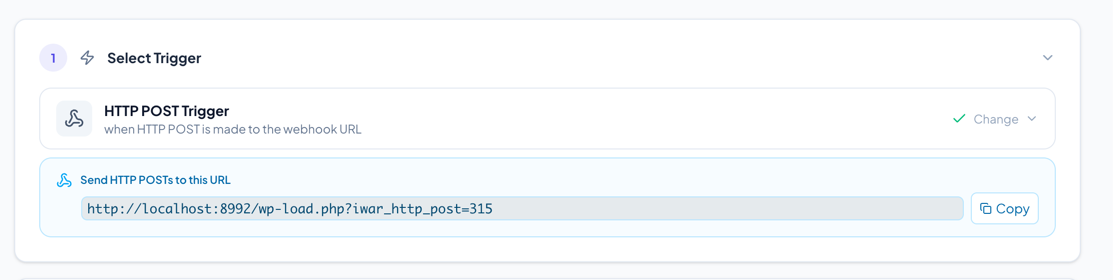
The URL format is:
https://yoursite.com/wp-load.php?iwar_http_post={recipe_id}
The recipe will look for the contact email in common POST fields: Email, email, email_address, Contact0Email.
You can pass custom data via POST fields and access them using the HTTP Post Value merge fields (e.g., {{HTTPPost:custom_field}}).
WooCommerce Subscription Event
Requires the WooCommerce Subscriptions plugin. Fires on various subscription lifecycle events. Use subscription-specific conditions to target specific events:
- Renewal payment completed
- Renewal payment failed
- Subscription status change
- First payment
- Trial ended
- Prepaid period ended
Selecting a Trigger
- In the recipe editor, Step 1 shows a grid of available triggers
- Click on a trigger to select it
- Once selected, the trigger appears as a summary card
- Click Change on the summary card to switch to a different trigger
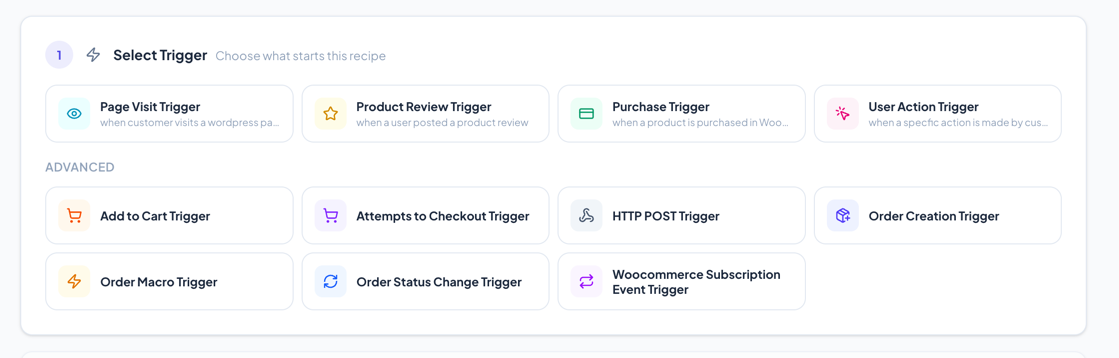
Note: Changing the trigger on an existing recipe may make some conditions or actions incompatible. Incompatible items will be highlighted with red borders and must be removed before the recipe can run.