Conditions
Filter when recipes execute using cart, product, contact, and advanced conditions.
Automation Recipes — Conditions
Conditions are optional filters that determine whether a recipe’s actions should execute. If all conditions pass, the actions run. If any condition fails, the recipe stops.
A recipe can have zero or more conditions. With no conditions, the recipe runs every time the trigger fires.
Adding Conditions
- In Step 2 of the recipe editor, click + Add Condition
- A dropdown appears with available conditions grouped by category
- Conditions marked with a star are recommended for the selected trigger
- Select a condition to add it
- Configure the condition’s settings and click Done
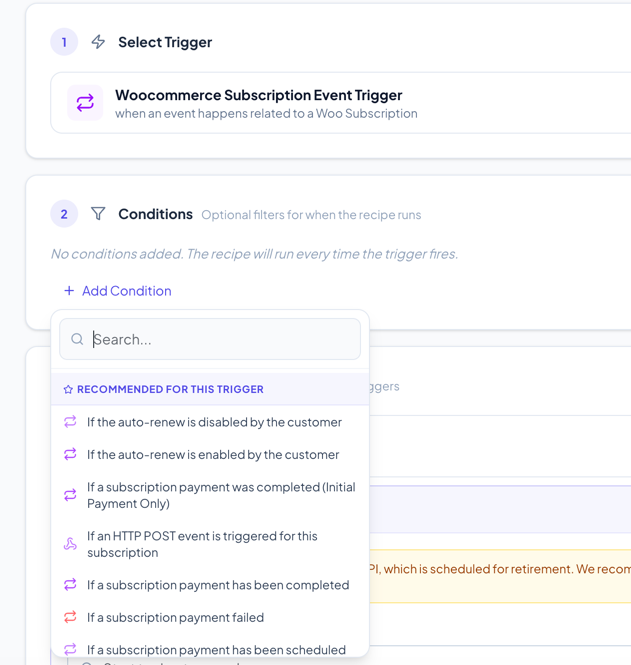
Available Conditions
Page & User Activity
| Condition | Multi-use | Description |
|---|---|---|
| When Page visited is … | Yes | Check which page the user is currently viewing. Supports: specific page, cart, home, product page, specific product, or URL pattern |
| If total time spent on the page/post is … | No | Check if the user has spent a minimum number of minutes on the current page |
| If total time spent on site is … | No | Check if the user has spent a minimum number of minutes on the site overall |
| If the user does this activity … | Yes | Check for specific user actions (click, scroll, form submit, etc.) |
| If user is logged-in in WordPress | No | Check if the user is currently logged in |
Cart & Checkout
| Condition | Multi-use | Description |
|---|---|---|
| If cart contains some product(s) … | Yes | Check if specific products, product categories, or product types are in the cart |
| If cart does not contain product(s) … | Yes | The inverse — check that certain products are NOT in the cart |
| If Shopping Cart total value is … | Yes | Compare cart subtotal against a value (greater than, less than, equal to). Use multiple times to set ranges (e.g., > $50 AND < $200) |
| When payment gateway used is … | No | Check which payment method was used (supports multiple gateway selection) |
| If order has custom fee | Yes | Check if the order contains a custom fee line |
| If order requires shipping | No | Check if the order requires shipping, optionally for a specific shipping method |
Order Status
| Condition | Multi-use | Description |
|---|---|---|
| When new order status is … | No | Check the order’s new/current status (e.g., processing, completed) |
| When previous order status was … | No | Check what the order’s previous status was before the status change |
Products
| Condition | Multi-use | Description |
|---|---|---|
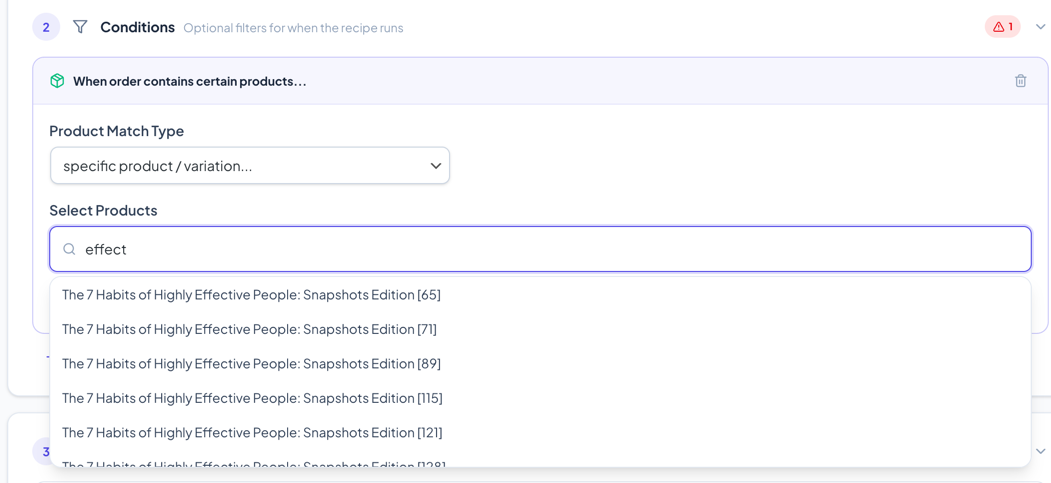
| When product added to cart is … | Yes | Check which product was just added to cart |
| If product is in the order … | Yes | Check if specific products are in the completed order |
| When the product reviewed is … | Yes | Check which product was reviewed |
Product match types (for product-based conditions):
- Specific product/variation — Search and select individual products
- From certain product category — Select one or more product categories
- From certain product type — Select product types (simple, variable, grouped, etc.)
Keap / Contact
| Condition | Multi-use | Description |
|---|---|---|
| If contact’s tags in Keap … | Yes | Check if the contact has or doesn’t have specific Keap tags. Options: has one or more, has all, doesn’t have one, doesn’t have all |
| Check if referral partner exists in Keap … | Yes | Check if a referral partner record exists |
| Check Merge Field Value … | Yes | Compare any merge field value against a target. Supports: equals, contains, greater than, less than, starts with, ends with, date comparisons, empty/not empty checks |
Advanced
| Condition | Multi-use | Description |
|---|---|---|
| If HTTP POST value is … | Yes | Check the value of an HTTP POST parameter (for HTTP POST trigger) |
| Check if today’s date is … | Yes | Compare current date against a target date |
| If user is in EU / If user is not in EU | No | Geolocation-based EU check |
Wishlist (requires YITH Wishlist)
| Condition | Multi-use | Description |
|---|---|---|
| Item is added to user’s wishlist basket | Yes | Check which product was added to wishlist |
| Wishlist item price has been changed | Yes | Fires on wishlist item price changes |
| Wishlist item stock has been changed | Yes | Fires on wishlist item stock level changes |
WooCommerce Subscriptions
| Condition | Multi-use | Description |
|---|---|---|
| When previous subscription status was … | No | Check the subscription’s previous status in a status change event |
| If an HTTP POST event is triggered | No | Allows external systems to trigger subscription events via webhook URL |
| Various subscription-specific conditions | No | First payment, renewal paid/failed, trial ended, prepaid ended, auto-renew status |
Multi-use Conditions
Conditions marked as “Yes” in the Multi-use column can be added multiple times to the same recipe. This is useful for creating complex filters:
Example: Cart value between $50 and $200
- Add “If Shopping Cart total value is …” — set to “is greater than $50”
- Add “If Shopping Cart total value is …” again — set to “is less than $200”
Both conditions must pass for the actions to run.
Condition Errors
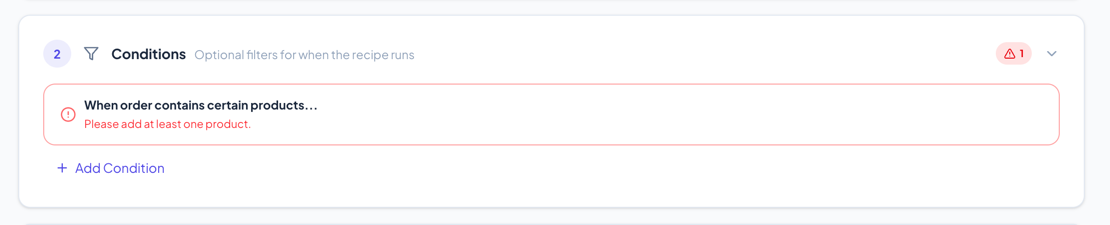
If a condition has a configuration error (e.g., missing required field), it will show:
- A red border around the condition card
- An error message describing what needs to be fixed
- The recipe will not run until all errors are resolved
Incompatible Conditions
If you change the trigger, some conditions may become incompatible (e.g., a cart condition on an order status trigger). Incompatible conditions show:
- A red border with “Incompatible with current trigger” message
- No edit button — you can only remove them
Next Steps
- Actions Guide — Define what the recipe does
- Merge Fields Guide — Use dynamic values in conditions