Merge Fields
Use dynamic values in recipe action fields with the merge field syntax.
Merge fields let you insert dynamic values into action fields. They are replaced with real data when the recipe runs.
Syntax
Merge fields use double curly braces with a colon separator:
{{Category:FieldName}}
Examples:
{{WPUser:user_email}}- The WordPress user’s email{{InfContact:FirstName}}- The Keap contact’s first name{{WCOrder:OrderId}}- The WooCommerce order ID{{Utility:current_datetime}}- Current date and time
Inserting Merge Fields
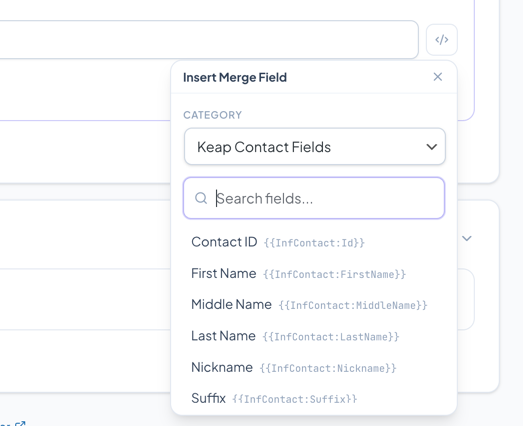
Fields that support merge fields show a code icon button on the right side of the input.
- Click the code icon to open the merge field picker
- Select a category from the dropdown
- Search or browse the available fields
- Click a field to insert it at the cursor position
Available Categories
WordPress User Fields
Fields from the current WordPress user profile.
| Field | Description |
|---|---|
{{WPUser:ID}} | User ID |
{{WPUser:first_name}} | First Name |
{{WPUser:last_name}} | Last Name |
{{WPUser:user_email}} | |
{{WPUser:user_login}} | Username |
{{WPUser:display_name}} | Display Name |
{{WPUser:pass_reset_link}} | Password Reset Link |
{{WPUser:billing_*}} | Billing address fields |
{{WPUser:shipping_*}} | Shipping address fields |
{{WPUser:total_value}} | Total Customer Value |
{{WPUser:role}} | User Role |
{{WPUser:generate_random_string}} | Generate a random password |
{{WPUser:LastOrderId}} | Last WooCommerce Order ID |
{{WPUser:LastPendingOrder}} | Last Pending Order ID |
{{WPUser:LastProcessingOrder}} | Last Processing Order ID |
{{WPUser:LastCompletedOrder}} | Last Completed Order ID |
Keap Contact Fields
Fields from the linked Keap contact record.
| Field | Description |
|---|---|
{{InfContact:Id}} | Keap Contact ID |
{{InfContact:FirstName}} | First Name |
{{InfContact:LastName}} | Last Name |
{{InfContact:Email}} | Email Address |
{{InfContact:Phone1}} | Phone |
{{InfContact:Company}} | Company |
{{InfContact:StreetAddress1}} | Street Address |
{{InfContact:City}} | City |
{{InfContact:State}} | State |
{{InfContact:Country}} | Country |
{{InfContact:PostalCode}} | Postal Code |
{{InfContact:Birthday}} | Birthday |
{{InfContact:_CustomFieldName}} | Custom Fields (prefixed with _) |
{{InfContact:LastOrderId}} | Most Recent Order ID |
{{InfContact:AllOrderTotal}} | Customer Value (All Paid Order Total) |
WooCommerce Order Data
Available when using order-based triggers (Purchase, Order Status Change, Order Creation, Order Macro).
| Field | Description |
|---|---|
{{WCOrder:OrderId}} | Order ID |
{{WCOrder:InfOrderId}} | Keap Order ID |
{{WCOrder:OrderNumber}} | Order Number |
{{WCOrder:OrderDate}} | Order Date |
{{WCOrder:OrderStatus}} | Order Status |
{{WCOrder:order_total}} | Order Total |
{{WCOrder:CouponUsed}} | Coupon Codes Used |
{{WCOrder:billing_*}} | Billing fields |
{{WCOrder:shipping_*}} | Shipping fields |
{{WCOrder:payment_method_title}} | Payment Method |
{{WCOrder:ProductNames}} | Product Names |
{{WCOrder:ProductNamesQ}} | Product Names with Quantity |
{{WCOrder:OrderItemTable}} | Order Items Table (HTML) |
WooCommerce General
| Field | Description |
|---|---|
{{Woocommerce:Website}} | Site URL |
{{Woocommerce:SessionLeadsource}} | Session Leadsource |
{{Woocommerce:GeoCountry}} | Country Code (geolocation) |
{{Woocommerce:CartCoupon}} | Coupons in Cart |
{{Woocommerce:LastCouponCode}} | Last Generated Coupon Code |
{{Woocommerce:SavedCartURI}} | Saved Cart URL |
{{Woocommerce:SavedCartwPrice}} | Saved Cart with Prices |
Utility / Other
| Field | Description |
|---|---|
{{Utility:current_datetime}} | Current Datetime (Y-m-d H:i:s) |
{{Utility:is_datetime}} | Keap-formatted Datetime |
{{Utility:current_date}} | Current Date (Y-m-d) |
{{Utility:current_timestamp}} | Current Timestamp |
{{Utility:N_days_datetime}} | Datetime N days from now |
{{Utility:timer_gif}} | Timer GIF Image |
{{Utility:wpml_lang}} | WPML Language |
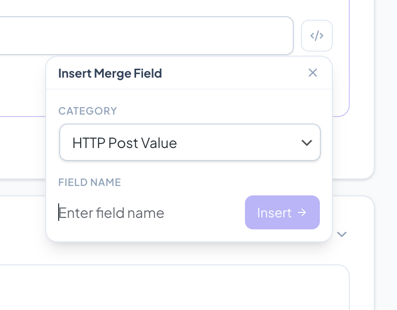
Custom/Free-Entry Categories
Some categories allow you to type any field name instead of selecting from a list:
| Category | Description |
|---|---|
| WP User Meta Field | Enter any WordPress user meta key |
| WooCommerce Order Meta | Enter any order meta key |
| Session Value | Enter any WooCommerce session key |
| Custom Filter Hook | Enter a WordPress filter hook name (for developers) |
| URL Passed Value (GET) | Enter a URL query parameter name |
| HTTP Post Value | Enter an HTTP POST parameter name |
For these categories, type the field name in the text input and click Insert.
Trigger-Specific Fields
Some triggers add their own merge field categories:
- Product Review Trigger adds
{{Comment:comment_content}},{{Comment:rating}},{{Comment:comment_author}}, etc. - HTTP POST Trigger adds
{{HTTPPost:field_name}}for accessing POST data - Wishlist Event Trigger adds
{{Wishlist:product_name}},{{Wishlist:old_price}},{{Wishlist:new_price}}, etc. - Order Macro Trigger adds
{{MacroInfo:admin_uname}},{{MacroInfo:admin_email}}
Using Merge Fields in URLs
You can use merge fields inside URLs for HTTP POST actions or redirect actions:
https://example.com/webhook?email={{WPUser:user_email}}&order={{WCOrder:OrderId}}
The merge fields are resolved before the URL is used.
Using Merge Fields in Page Content
The [iw_merge] shortcode lets you use these same merge fields in any WordPress page or post content. See Developer Overview - Shortcodes for details.